 EstateLuma · Guide
How to use the workspace
From a property description to a site, a deck, social posts, a film, a vertical reel and a market read. Each section below is also linked from its screen in the workspace — look for the Guide button.
- 01Getting startedthe property path
- 02Videoshot by shot · morph · Landing Pro
- 03Reels 9:16vertical reel with camera tricks
- 04SEO packkeywords, listing copy, schema.org
- 05Market analysisrange, fair price, owner arguments
- 06Documentsdossier check against the fact sheet
- 07Prices and balancewhat each action costs, in dollars
The property path
Every property is its own workspace: shot library, audit, fact sheet and materials. The tabs run left to right in the order you normally work.
New property
Paste whatever you have — a listing, an agent's email, notes. The service fills in the card and the fact sheet; you only check them.
Materials
Drop 10–30 photos (originals, not web copies). Each shot is analysed: what is in it, time of day, defects such as a tilted horizon or an empty room.
Audit
Readiness of every material and what will raise it: which shots to add, which fields to fill. Press Update after you add photos or data.
Fact sheet
The facts behind every text: areas, finishes, pool, distances. Fields pulled from the description are marked — confirm or correct them. An empty field simply stays out of the materials.
Build
Tick Landing, Landing Pro, Social Pack or Property Deck and press Build. Each build or update is $0.10; Landing Pro is $2. Different properties build in parallel.
Video
The property film, made shot by shot or as one continuous fly-through. See 02 · Video.
Reels 9:16
A vertical reel for Instagram, TikTok and Shorts with a camera trick between shots. See 03 · Reels.
Deliverables
Everything opens right there, downloads one by one or as a single archive, and rebuilds with one click.
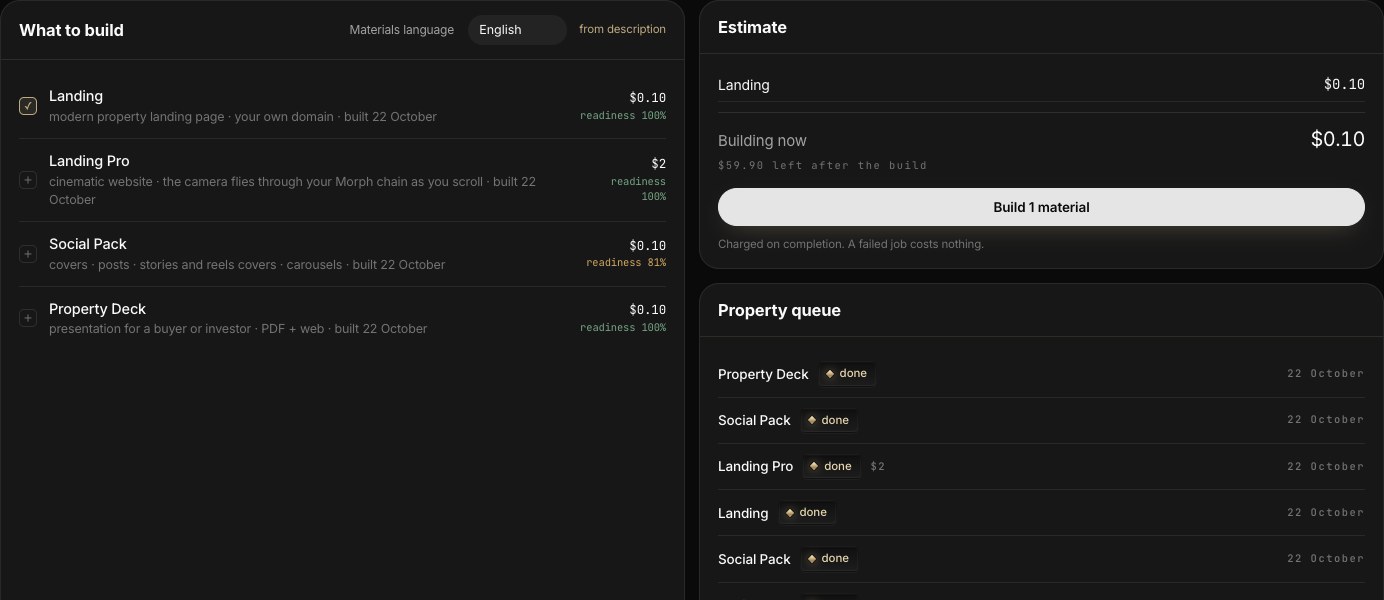
The service does not invent. It will not draw a room that is not in your photos, and every generated shot is labelled in the library.
The property film
One screen, two ways for the camera to move. You choose the shots, review a cheap 768p draft, write fixes, and only then pay for the 1080p final — which is the same take you approved.
Choose how the camera moves
Shot by shot
Every photo comes alive: a slow camera move inside one shot, soft cuts between shots. One shot = one 6-second clip. The classic listing and social video.
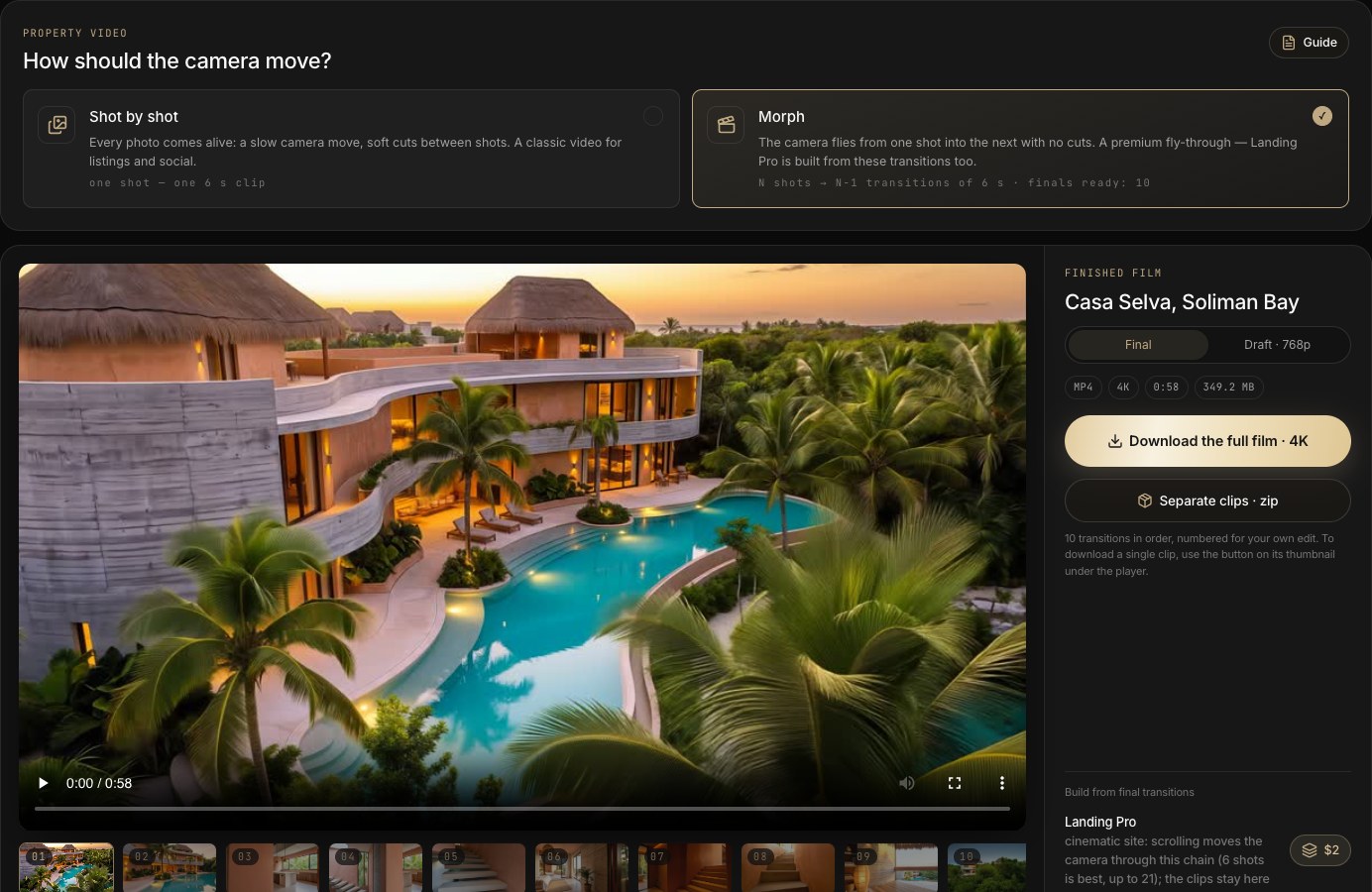
Morph
The camera flies from one shot into the next with no cuts. N shots give N−1 transitions of 6 seconds. The premium fly-through — and the only source for Landing Pro.
Each mode keeps its own chain and its own clips, so you can have both for one property.
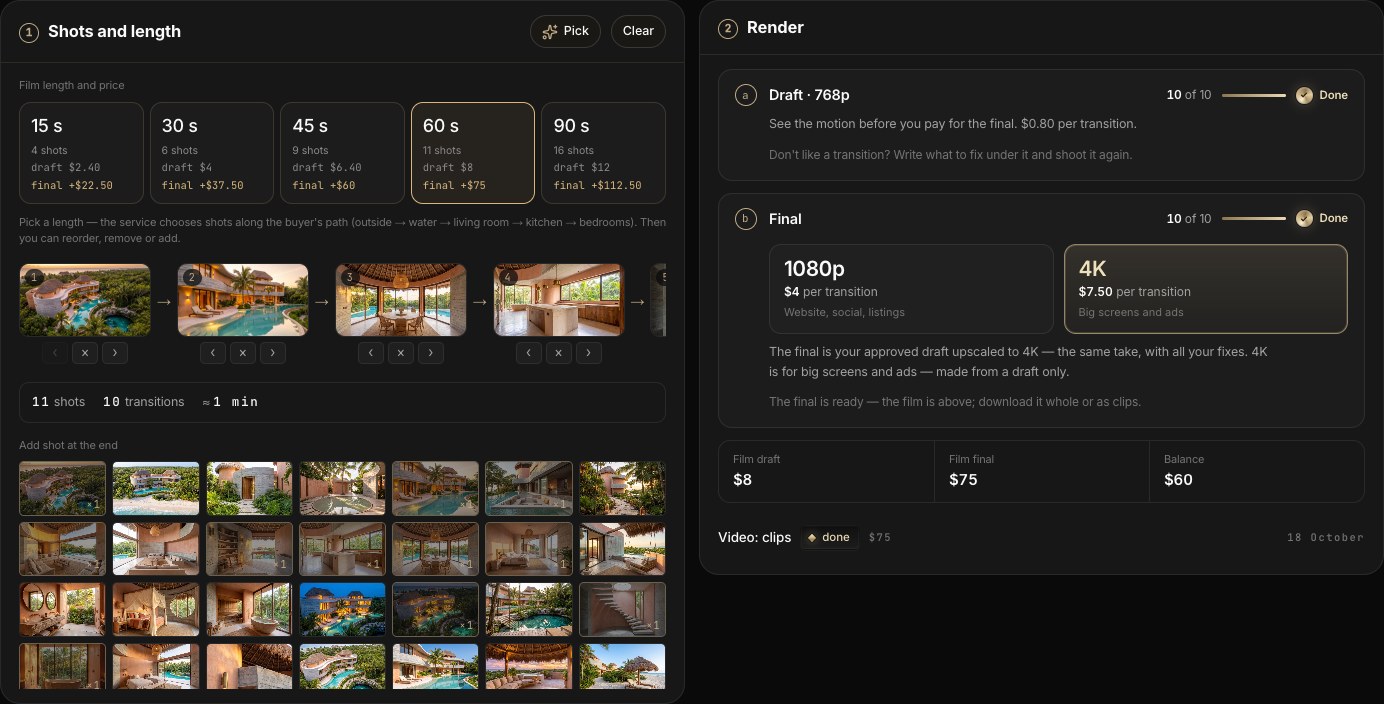
Step 1 · Shots and length
Press a length tile (15 s to 90 s) or Pick — the service lines up shots along the buyer's path: outside → water → living room → kitchen → bedrooms. Each tile shows the draft price and what the final adds.
Then edit the chain: ‹ › move a shot, × removes it, a click in the library below adds a shot to the end. In Morph a shot can appear twice; the counter on the thumbnail shows how many times.
Step 2 · Render
Draft 768p — see the motion before paying for the final. $0.80 per transition or clip.
Final 1080p or 4K — your approved draft upscaled: the same take with all your fixes, sharp and stable. Pick the quality with the 1080p / 4K switch: $4 or $7.50 per transition. 4K is for big screens and ads and is made from a draft only. A transition without a draft is rendered from scratch in 1080p for $2 and may come out differently.
Transitions render in parallel, four at a time — usually 5–8 minutes for a draft. Finished clips appear one by one; you do not have to wait for all of them.
Step 3 · Review and fix
Each transition has its draft, its final and a field What to fix. Write it in plain words — "slower", "enter through the glass door", "no light change" — then press Draft again for that one transition. The note saves itself. Under the field you see the camera path the service planned from the two shots.
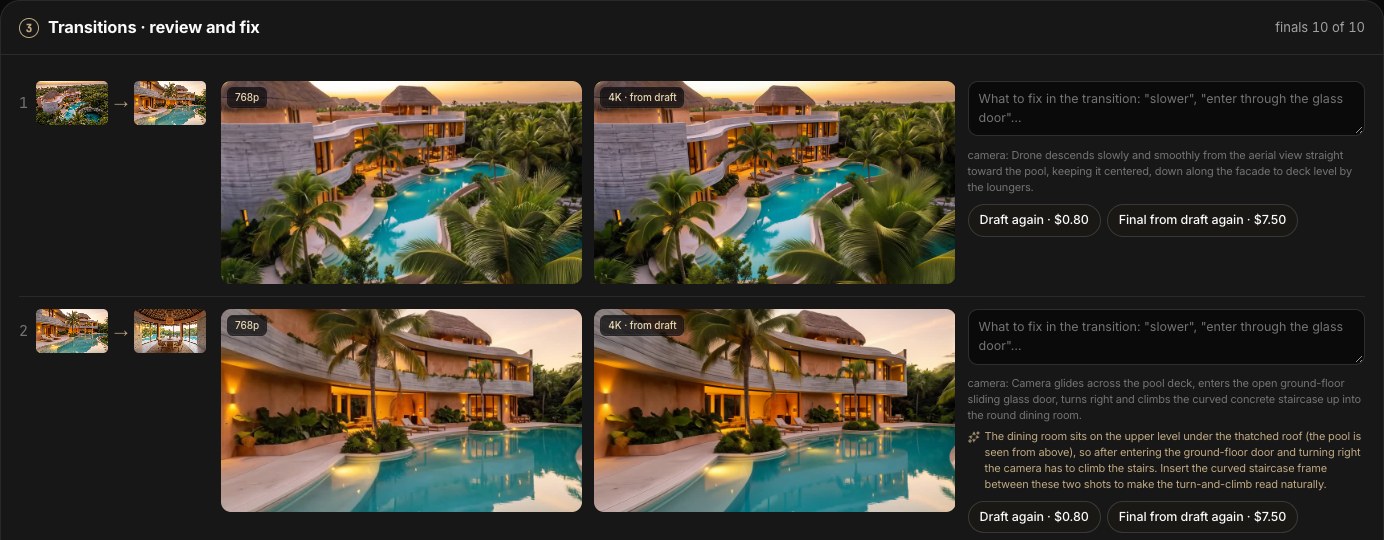
- “note is newer” — you changed the fix after the draft: shoot the draft again, then the final.
- “draft is newer” — the final was made from an older draft: make the final again ($4 in 1080p, $7.50 in 4K).
- “older quality” — the final was upscaled before 13 October with the previous model; one click lifts it to the current quality.

The finished film
The film sits at the top of the screen with a Final / Draft · 768p switch. Download the full film gives one MP4; Separate clips · zip gives numbered clips for your own edit.
If clips changed after the film was assembled, a note offers Re-assemble · free. Assembling takes 3–4 minutes and the screen updates by itself.
Landing Pro
A cinematic site where scrolling flies the camera through your Morph chain. It needs at least 2 final transitions; 6 shots is the sweet spot. Build it from the panel next to the film — $2 per build.
Prices by length (Morph)
| Film | Shots | Transitions | Draft 768p | + Final 1080p | + Final 4K |
|---|---|---|---|---|---|
| 15 s | 4 | 3 | $2.40 | $12 | $22.50 |
| 30 s | 6 | 5 | $4 | $20 | $37.50 |
| 45 s | 9 | 8 | $6.40 | $32 | $60 |
| 60 s | 11 | 10 | $8 | $40 | $75 |
| 90 s | 16 | 15 | $12 | $60 | $112.50 |
Prices are charged to your balance on completion. Redone drafts are charged again; a failed transition costs nothing. Assembling the film is free.
Tips for a good chain
- Neighbouring shots should share something — the same façade from two distances, a terrace and the room behind its glass. The further apart two shots are, the more the model has to imagine.
- Keep the light consistent: day to night inside one transition looks like a jump cut.
- Start wide (aerial or façade), go in through glass or a door, end on the best view.
- Fix one thing at a time in What to fix; a short note works better than a paragraph.
A vertical reel with camera tricks
For Instagram, TikTok and Shorts. Between every pair of shots the camera does a trick — dives through the ground and comes up through the floor, flies through the glass, rises through the ceiling. Final quality 1080 × 1920 straight away, no draft; 4K if you want it.
1 · Shots
Choose how many shots (4–10) or press Pick — the service lines them up along the buyer's path. The 9:16 frame places itself on the details of each photo; ◂ ▸ on the card shifts it, the arrows reorder shots.
2 · Moves and pace
Between shots pick a move — Through the ground, Through the glass, Through the ceiling, Rise, Dive, Whip pan, Roll, Crash zoom or Smooth glide. ✦ marks a move picked automatically from the scenes. The pace sets 3, 4 or 5 seconds per transition.
3 · Render and fix
Transitions render in parallel, about 1.5 minutes per wave. Don't like one — change its move or write a short wish ("slower dive", "come out by the fireplace") and re-render only that transition.
4 · 4K and library
Upscale to 4K lifts the same reel for ads and big screens. Save to library & start a new reel keeps the finished reel, its 4K and transitions under Finished reels.
Prices
| Action | Notes | Price |
|---|---|---|
| Transition 1080p | pace 3 s · 4 s · 5 s | $0.80 · $1 · $1.20 |
| 4K upscale | per second of the reel, plus $0.80 per transition (overlap) | $0.80 / s |
Example: 6 shots at 4 s — 5 transitions, a 20-second reel: 1080p $5, 4K $20 on top. Re-rendering a transition is charged again; a failed one costs nothing.
No music or text in the reel. Add the track and captions in Instagram or TikTok — that way the reel works with trending audio.
So buyers find the property by search
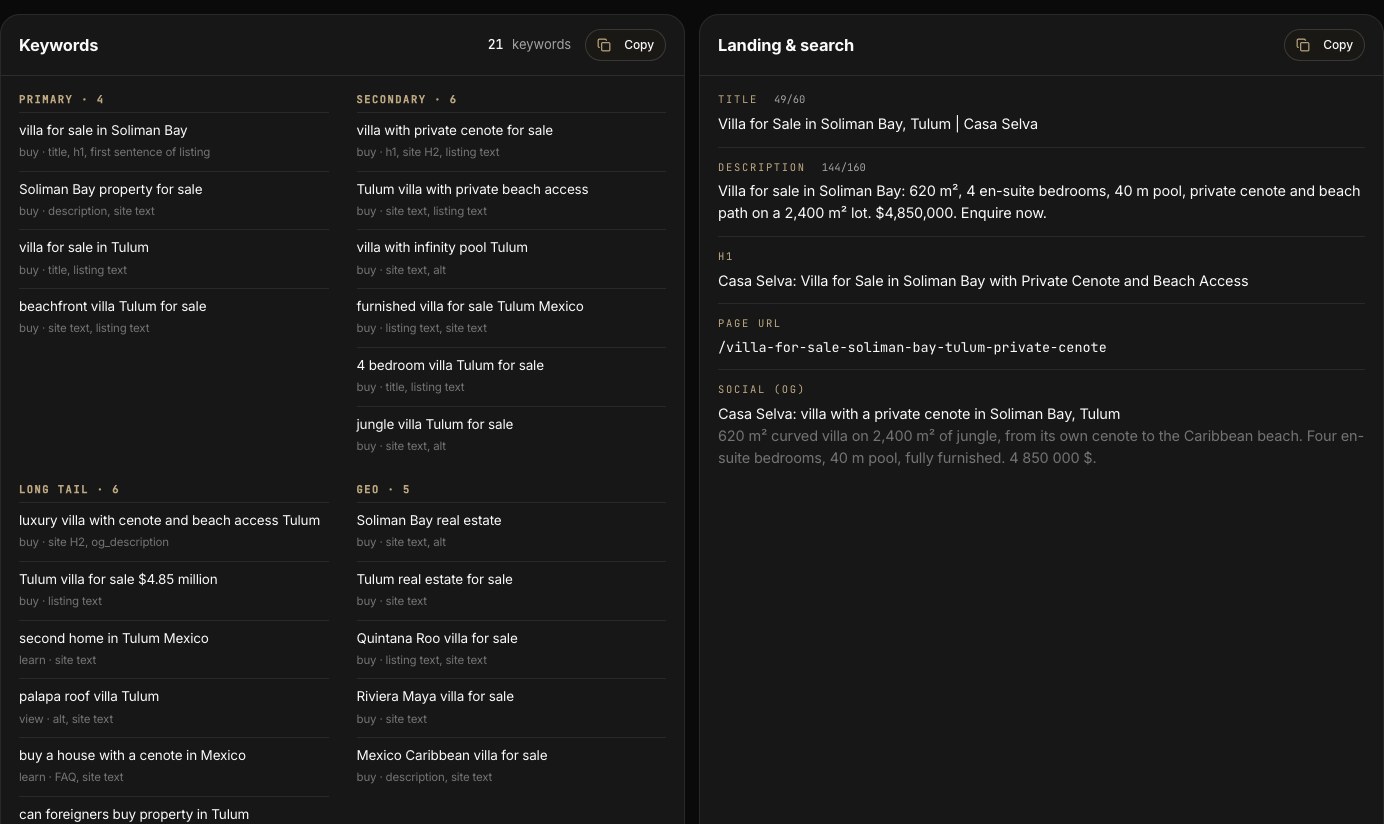
One click writes everything a listing and a property site need for search — built only from facts in the card and the fact sheet. $0.10 per build, usually 1–2 minutes.
Choose the markets
EN — Google and international portals: keywords, portal copy and FAQ written for international buyers.
What is inside
- Keywords — primary, secondary, long tail and geo, each with the search intent and where to use it (title, H1, listing text, alt).
- Landing & search — title (≤60), description (≤160), H1, page URL, social preview (OG).
- Listing for portals — ready copy with a character count.
- Website copy — sections for the property site, plus FAQ.
- Photo captions (alt) for every shot.
- Code for your own site — a
<head>block with schema.org markup. - What to do next — which facts to add so the keywords get sharper.
How to use it
Check volumes
The service does not invent search volumes. Check the keywords in Google Keyword Planner and Google Trends and keep the ones with impressions.
Paste into the listing
Use the portal copy as is or trim it; the first sentence already carries the main keyword.
Paste into your site
Put the
<head>block into your page and the alt captions on your images.Fill the gaps, rebuild
Add the facts from What to do next to the fact sheet and press Rebuild — $0.10.
Where the price sits in the market
The assistant finds comparable listings on the portals, compares prices across portals and gives you a range, a fair price, liquidity, rental yield — and arguments for the conversation with the owner.
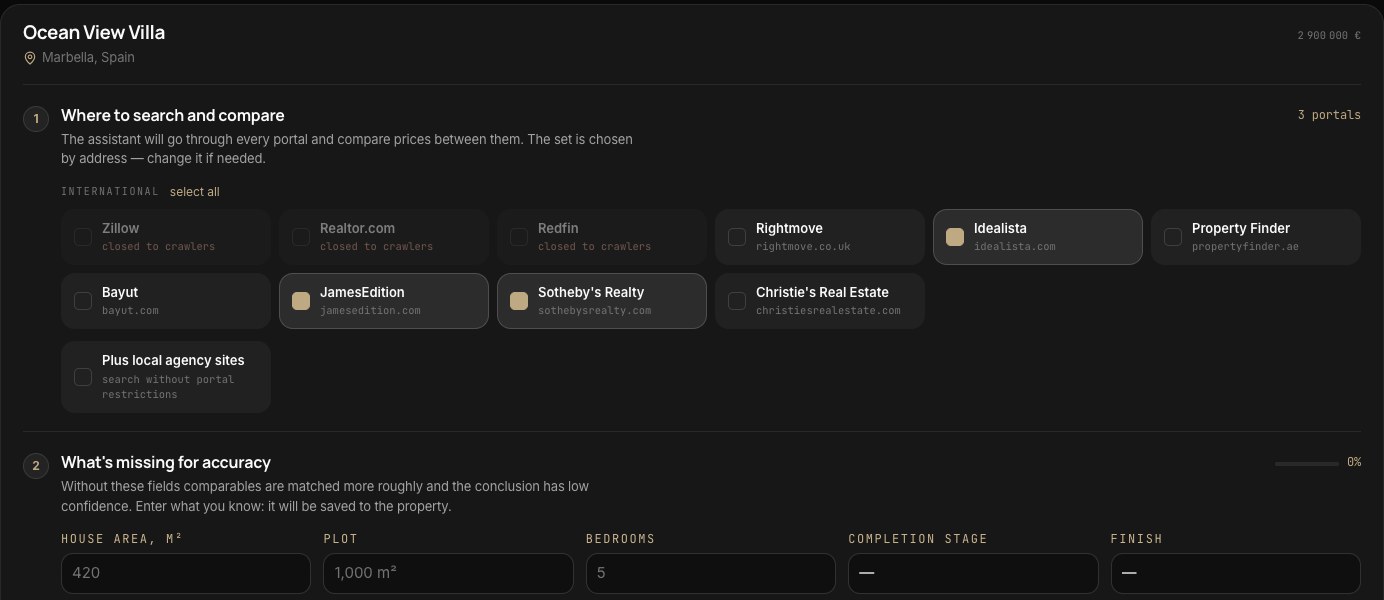
1 · Pick the property and portals
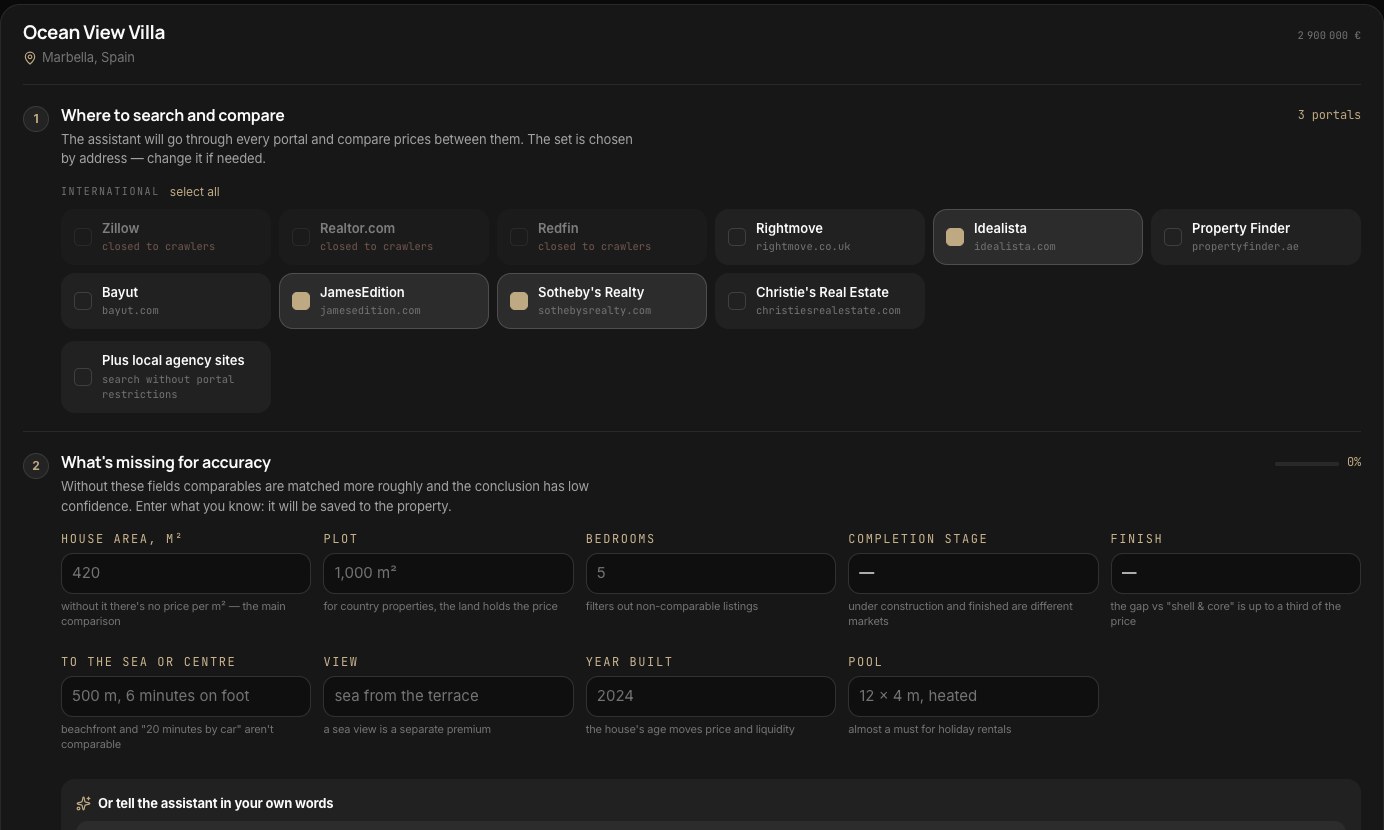
The portal set is chosen from the address: Zillow and Redfin for the US; JamesEdition, Sotheby's Realty and Christie's for luxury anywhere; Rightmove for the UK; Idealista for Spain, Portugal and Italy; Property Finder and Bayut for the UAE. Change it if you need — Plus local agency sites searches without the portal restriction. Portals that block search robots (such as Zillow and Redfin) are shown but can't be selected.
2 · Fill what is missing
Without address and price there is nothing to compare. Plot size, completion stage and area make the match tighter — type them in, or describe the property in your own words and press Complete with the assistant. Everything you enter is saved to the property.
3 · Quick or full
Quick — two of the selected portals, 2–4 minutes. Full — every selected portal and a deeper read, 5–12 minutes. Analyses within your plan are already paid for; beyond it a quick one is $0.60 and a full one $1.20. You can leave the screen; you are charged only for a finished analysis.
Reading the result
Verdict and range
Below, at or above market, with the corridor of comparable prices and how far your price is from it in %.
The scale
Each house icon is a comparable listing — hover to see it, click to open it on the portal. The band is the market range, the line is your price, the mark is the fair price.
Liquidity and yield
How long such a property realistically takes to sell at this price, and — where it fits — monthly rent, yield and payback.
Comparables and portals
A table of listings with area, price, price per m² and a note on what is similar and what is not; then the median by portal.
Owner arguments
3–5 calm, fact-based points for the price conversation — with a Copy button.
What to do to sell
4–6 concrete actions to sell faster or for more, plus strengths and risks as a buyer sees them.
A negotiation guide, not a valuation report. Comparables are open asking prices, not closed deals. When there are few good comparables, confidence drops and the summary says so.
The dossier check
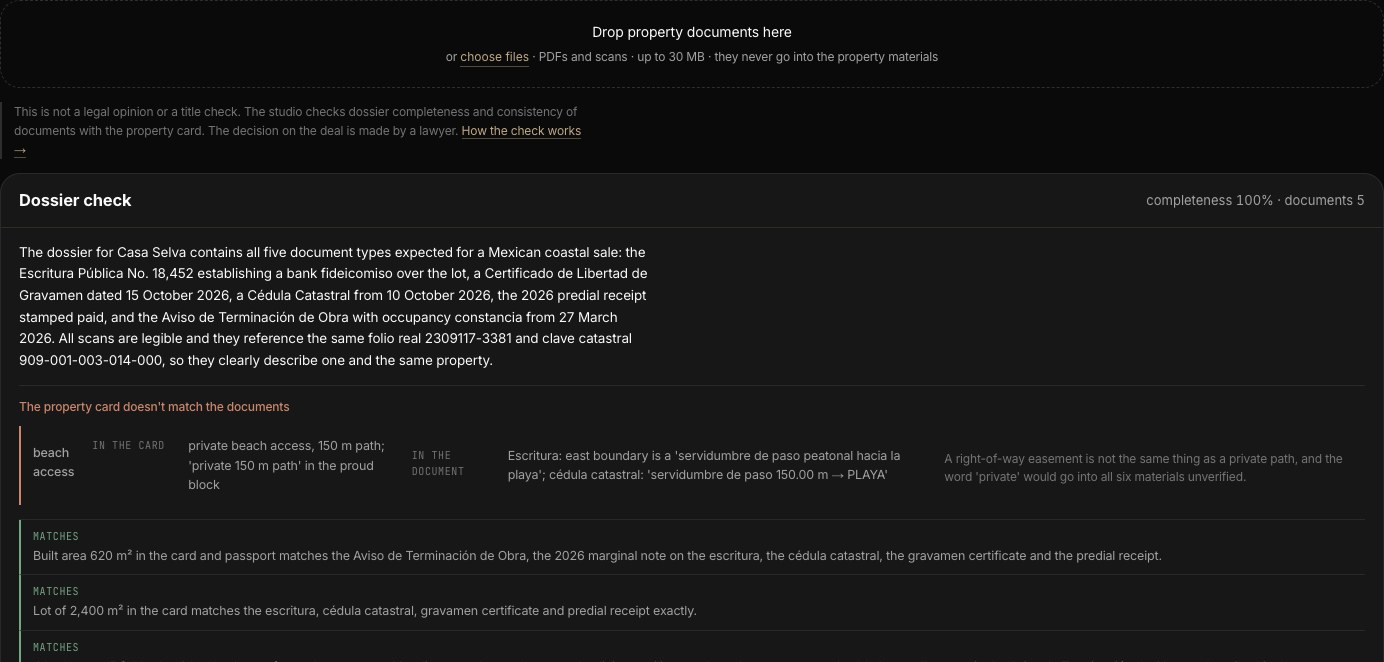
Upload the property's documents. The studio reads them, checks the dossier for completeness and compares every document with the property card — then tells you what does not match and what to ask the owner for. $1.10 per check.
What to upload
PDFs and scans or photos, up to 30 MB each: the title document (in the US — the Grant or Warranty Deed), the agreement it is based on (Purchase Agreement), the technical plan, cadastre, permits, an encumbrance certificate (Preliminary Title Report), HOA papers, tax and utility receipts, a power of attorney, a lease. A scan that can't be read is flagged — upload a sharper copy.
Documents never go into the property materials.
What you get
- What the deal needs — the document set for the property's country (USA, Spain, Cyprus, Turkey, UAE, Thailand and others). The country is taken from the address; to change it, use Fact sheet → Title and status. For other countries only consistency is checked.
- Where the card and the documents disagree — the value in the card and the value in the document, side by side.
- What to ask the owner for — the missing papers, in plain words.
- Can be moved to the fact sheet — facts found in the documents, added with one click.
This is not a legal opinion or a title check. The studio checks completeness and consistency; the decision on the deal is made by a lawyer.
What each action costs
Prices are in US dollars and are charged to your balance on completion — a job that fails costs nothing and can be retried with one click. Properties and market analyses within your plan are already paid for. Plan balance lasts 60 days; top-ups never expire.
| Action | Notes | Price |
|---|---|---|
| Description, shot analysis, audit, property texts | new property, Materials, Audit, Data | included |
| Property beyond the plan | or on Custom · analysis, audit and copy for every material | $2 |
| Landing · Property Deck · Social Pack · SEO pack | each build or update | $0.10 |
| Landing Pro | cinematic site built from your Morph film | $2 |
| Rewrite the copy | a fresh write-up after you change the property or photos | $1.20 |
| Documents check | title papers against the property card | $1.10 |
| Video draft 768p | per transition or clip | $0.80 |
| Video final from draft | per transition or clip · 1080p · 4K | $4 · $7.50 |
| Video final without a draft | a new render in 1080p, may differ from expectations | $2 |
| Reels 9:16 transition | 1080p · pace 3 s · 4 s · 5 s | $0.80 · $1 · $1.20 |
| Reels 9:16 in 4K | per second of the reel, plus $0.80 per transition | $0.80 |
| New 4K frame · upscale for print | another light, time of day, angle or aerial · ×3 for print | $1 |
| Market analysis beyond the plan | quick · full | $0.60 · $1.20 |
| Assistant | per message | $0.10 |
| Assembling the film | the full film and the zip of clips | free |
Plans
Start · $59 / mo
$60 balance · 3 properties · 5 quick and 1 full market analysis.
Pro · $179 / mo
$180 balance · 10 properties · 15 quick and 5 full market analyses.
Agency · $449 / mo
$450 balance · 25 properties · 40 quick and 15 full market analyses.
Custom · from $25
Pay as you go for 30 days at the same prices. On top of a live plan you can top up from $10 under Balance.
Also in the workspace
Deal
Who the owner is, the stage of the talks, and the next step with a date — that date is what shows up as “today” on the overview.
Viewings
Book a viewing; the day before you get a checklist and a route, after it — buyer impressions, a thank-you and a short owner report.
Assistant
Ask anything about the property; it runs the free analysis itself and suggests paid builds or fill-ins as a button — you are charged only when you press it.